When it comes to access control systems, you primarily have two options when it comes to wiring, Wiegand and OSDP. Wiegand was the standard for most installations since the 1970’s and, up until ~2011, is most likely what your systems have been running on. In more recent installations, OSDP, which stands for Open Supervised Device Protocol, has become the security standard. So, why switch to OSDP?
So, where does OSDP come into the picture and why do we need it? As cyber-physical attacks grew more sophisticated, security professionals realized that Wiegand's unencrypted, one-way communication left facilities exposed. In 2011, the Security Industry Association (SIA) introduced OSDP to replace Wiegand. OSDP was designed to provide a secure, bidirectional, and open-source communication protocol. In 2020, OSDP was officially approved as an international standard (IEC 60839-11-5), supporting its status as the default choice for modern, secure enterprise installations.
One issue I have seen in the security industry is that physical access control is typically managed by the physical security team and may not have much involvement with the cyber side of the house. In fact, many cyber security analysts do not fully understand the physical access control systems or may not even be aware that they are on the network and have vulnerabilities. Many of the physical security teams lack the knowledge around technology to fully consider the potential risks for these legacy systems, similar to CCTV systems.
Let’s take a look at the differences between Wiegand and OSDP to review why you should be making the change.
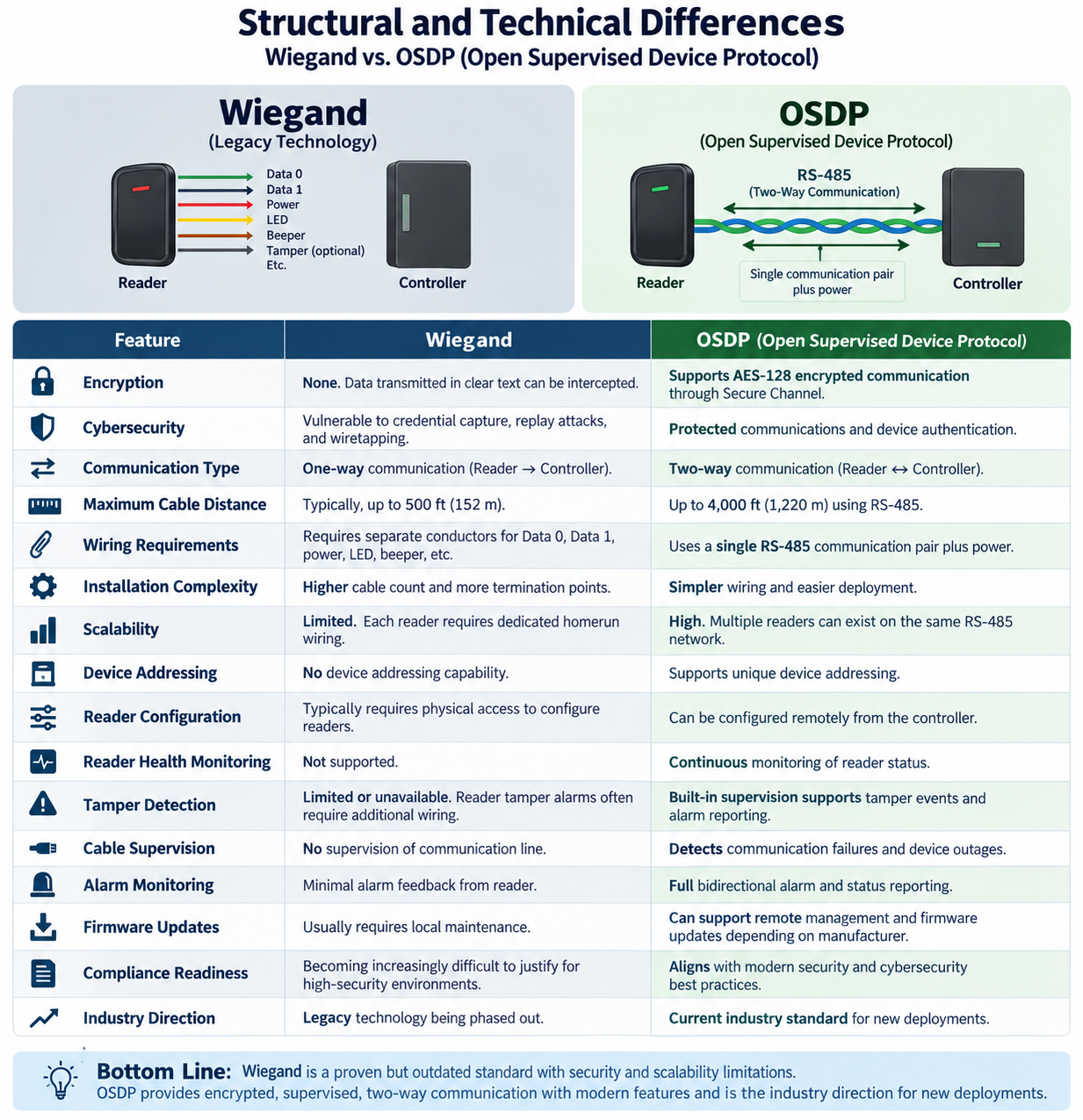
Operation Vulnerabilities
Probably the biggest vulnerability regarding security is that fact that Wiegand transmits data in plain text, making it vulnerable to interception and card cloning. It is a simple, wired point to point interface which is generally cheaper to install. In comparison, OSDP supports advanced encryption to secure communication between card readers and controllers. But why is this a concern for access control systems?
The Cyber Threat (Wiegand Hacking): Because Wiegand data is unencrypted, an attacker can use several different devices, like a FlipperZero, to tap the physical wires behind a card reader. The hacker can intercept the plain-text facility code and card number when a user swipes and then replay that data later to unlock the door.
How does OSDP differ in regard to encryption keys? OSDP uses a feature called Secure Channel, which establishes an encryption key between the reader and the control panel. Even if an attacker physically splices into the RS-485 communication wires, all they will capture is encrypted data traffic that cannot be reverse-engineered or replayed.
OSDP is highly beneficial for large complexes. It allows you to centralize your access control panels in a single, secure room while running cables to distant perimeter gates or buildings. This has been one of the biggest advantages I have seen with OSDP. I primarily run access control systems in large industrial sites. Previously, we would have panel boxes mounted around the facility in various places to meet the length requirements, hopefully in an IT closet but not always. This can be an issue if we have a power or network issue and need to have the panels reset. When we, the security technology team, are not at the physical location, as we have hundreds of sites globally, we are sending the local IT technician aimlessly looking for these panels to conduct a reset. I know it would be much more efficient to have a map of where all these panels are located, however, anyone who has worked in large manufacturing plants understands my struggle in keeping that up to date, especially with these older legacy installations.
Under the old Wiegand standard, long cable runs were a major vulnerability. Wiegand maxes out at 500 feet (150 meters) due to signal degradation. If you try to push Wiegand beyond that limit, the voltage drops, resulting in dropped card reads, corrupted data, or complete communication failure. OSDP solves this problem by using the RS-485 serial communication standard, which fundamentally changes how data travels across a large campus. OSDP reliably transmits data across cable distances of up to 4,000 feet (1,200 meters) without requiring expensive signal boosters or inline extenders. This means a single, centrally located security or IT closet can service card readers placed nearly three-quarters of a mile away. This can be a huge advantage to physical security of the access control panels, or at least it has been for me.
In a Wiegand setup, a long cable run means hundreds of feet of unencrypted data lines running through drop ceilings, crawl spaces, and exterior conduits. An attacker only needs to find one hidden spot to slice into that cable and intercept user credentials.
Because OSDP uses AES-128 encryption (OSDP Secure Channel), the entire 4,000-foot length of that cable is fully encrypted. Even if a threat actor physically taps into the wire halfway across the campus, they will only see unreadable cryptographic noise.
What if you have a GSOC or Fusion center that handles portions of your security technology? Well, OSDP can assist with that.
1. Bidirectional Communication vs. One-Way Static
Wiegand is a strict "one-way street" designed only to drop card data down to a panel. It has no data protocol or processing logic to handle incoming files from the controller. OSDP features two-way (bidirectional) communication. The controller and reader constantly talk back and forth, allowing the controller to push large data packets, like a firmware file, directly down the line to the reader's processor.
2. Mass Remote Deployment vs. Manual "Truck Rolls"
In a Wiegand-based facility with 200 doors, updating readers means a technician must physically visit every single door with a laptop, configuration card, or specialized programming cable. This is called a "truck roll" and costs thousands of dollars in labor and hours of downtime. With OSDP, a security administrator can log into the central Access Control Software (head-end) and push a firmware update to all 200 readers simultaneously with a few clicks.
I used this as one of my primary business justifications for updating many of our larger locations. For example, I saw $1,000 minimum charges for troubleshooting door issues from vendors and since I did not have local technicians at all of our sites, moving the largest locations to OSDP significantly reduced our reliance on vendor support.
If you are running a Security Operations Center (SOC) and taking in alerts from your systems, OSDP has advantages in this area as well. With Wiegand, if a reader is damaged or disconnected, there is no way for that alarm to get back to the SOC without running additional hardware. However, with OSDP, there is constant communication with the reader and, if the reader goes offline, the system will immediately alert your SOC.
Does your SOC manage the firmware updates for your access control? If so, OSDP allows your SOC to push patches across the network. If you are still running Wiegand, you are most likely either having technicians go out to each location to flash the update or leaving your systems vulnerable to risk.
This can be a huge cost advantage for management to consider. Remote patching and ticket management along with 3rd party fees for technicians to update Wiegand systems can easily be eliminated by moving to OSDP. From a risk standpoint you can also factor in the timeline it would take for your team to patch the system if there was a zero-day vulnerability detected. If you are on Wiegand, how long is that going to take you to schedule technicians to each site? During that time, you are vulnerable and need to manage the risk. If you have OSDP, you can simply push an update from the SOC.
How to make the move from Wiegand to OSDP?
When I first took on a large enterprise project for changing our access control from Wiegand to OSDP I realized quickly I was going to need to take it in phases. I had over five thousand doors across NA, EMEA, LATAM, and APAC. There was not going to be a simple way to make this move, and it was going to take some time. Additionally, I was dealing with a fragmented enterprise that had a slew of different access control cards e.g., Indala, HID, Hirsch, low frequency, high frequency and a variety of others. Our first step was addressing the security policy to assure that all new system installations would be “future proof” or as best we could with current technology. We adjusted our SOP to require OSDP and 35-bit HF cards on all new installs.
Our next step was twofold, we identified which systems were no longer supported and would need to be addressed, this was primarily Indala, and we also identified our higher risk areas e.g., data centers, research facilities, and corporate offices. I would highly recommend you utilize your Business Continuity team to assess critical sites if you do it this way. They may also be able to help gain support for this upgrade.
Once we were able to identify which sites still had legacy Indala systems, which we determined to be a higher risk, and which were our most critical sites supported by criticality, we began working with leadership from those locations to replace the systems.
The move to OSDP did not happen overnight, but identifying now can help you refrain from making your problem worse and begin properly assessing risk you may have.